
RotBotA screen time blocker for iPhone.
You set a daily limit for each app, category or website that eats your day: up to six limits, and anything you add past that joins one of them. Under that limit, everything opens like normal. Past it, that app is blocked until your daily reset, and getting back in is deliberately hard.
By Covelo Tech · makers of Hari, SplashCenter and Stop the Timer.
One limit, and it means it.
Most blockers give you a wall and a snooze button. RotBot gives you one number a day per app, and past it the wall does not negotiate.
Under your daily limit
Everything opens like normal. No block screen, no nagging, nothing to tap through. RotBot is just counting.
Past your daily limit
That app is blocked until your daily reset. Getting back in is deliberately hard, and it gets harder the more you do it in the same day, up to a point.
Up to six limits, and anything you add past that joins one of them. Set the limit to zero and that app is blocked all day. Blocked hours are separate: pick a time span and the days it runs, and the app stays shut through it whatever the limit says.
Three decisions, then it runs itself.
Pick what to limit
Individual apps, whole categories, or websites. Up to six limits, and anything you add past that joins one of them. You can also combine a few picks into one shared limit.
Set one number
A daily limit for that app. Change it whenever you want: stricter lands right away, looser waits for your next daily reset.
Get on with your day
Apple's Screen Time frameworks do the enforcing, on the device. Nothing about your usage is sent anywhere.
The rest of the app.
Blocked hours
A time span plus the days it runs. That app stays shut through it, whatever your daily limit says.
Ask me before each open
Switch it on for a limit and every open starts with a timer you set yourself. You switch it off in the same place you switched it on.
Two warnings per timer
One at the halfway mark, one about two minutes before the end. Turn either off and it is gone from every timer.
Clean-day streaks
A day where you stayed inside every limit is a clean day. That is the number the app is proud of.
Home screen widget
Where your limits stand right now, without opening the app.
A Lock Screen card
While a timer runs, the Lock Screen and Dynamic Island show that it is running. No ticking number, because we cannot keep one honest.
Your own numbers
Charts of where the time actually went, drawn on your phone from Apple's Screen Time data.
Not another wellness app with an opt-out.
The goal is a limit that still means something at 11pm, without charging you a subscription for the privilege.
No subscription. No paywall.
Free to download and free to use. The part that actually blocks is not behind a purchase, because it is your own screen time and charging you for it would be absurd.
Loosening waits until tomorrow
Making a limit stricter happens right now. Making it looser lands at your next daily reset. The version of you that set the limit gets a say in the version that wants past it.
The block does not negotiate
Past your daily limit that app is blocked until the reset. Getting back in is deliberately hard, and it gets harder the more you do it in the same day, up to a point.
Your usage stays on your phone
Minutes, the apps you picked, and the names you give your limits stay on the device. No analytics SDK, nothing to sell, nothing for us to lose.
Every limit on one screen.
One row per limit, one number each, up to six. This is the whole board, not a summary of it.
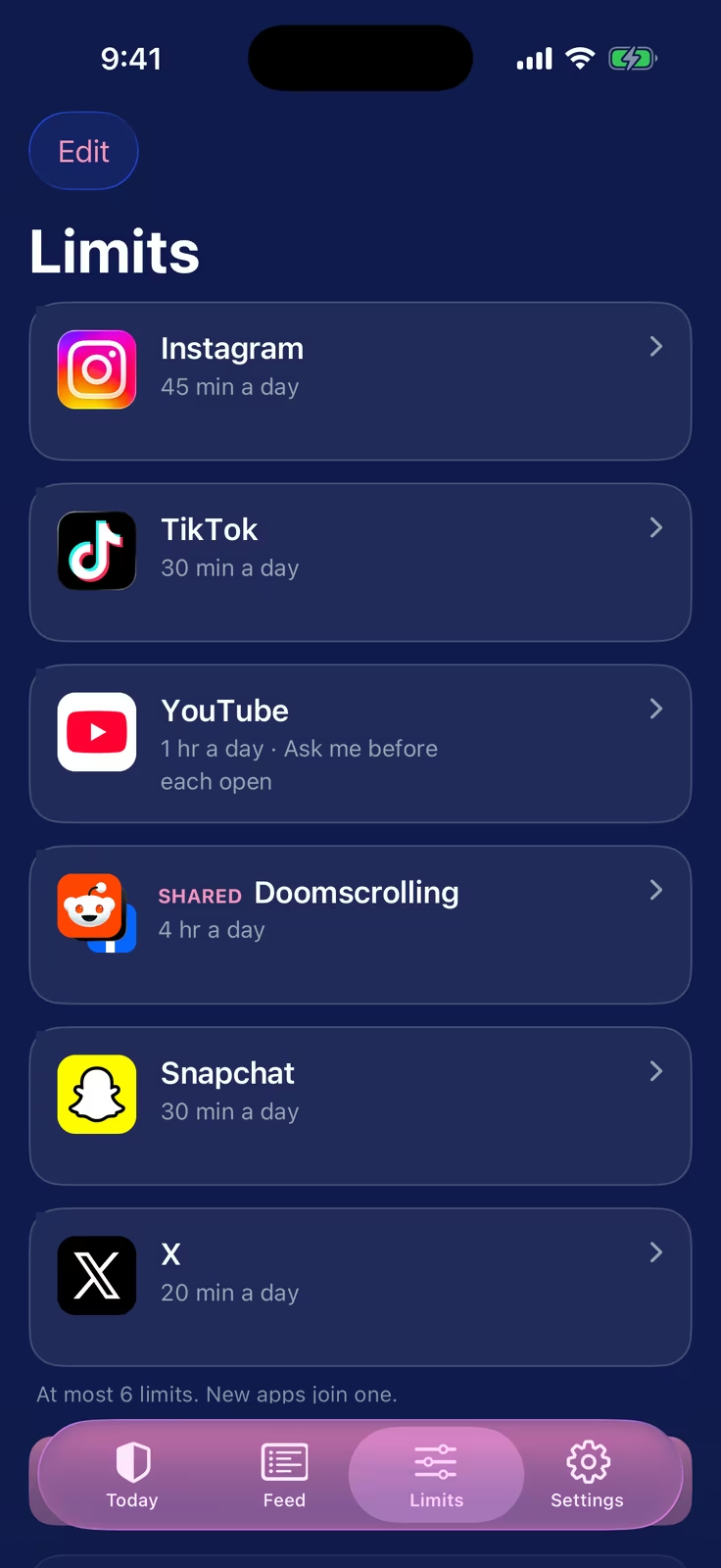
A real screen from a build in progress. The apps shown are the ones people most often limit, placed over the build’s test names. The design is not final.
Coming soon to the App Store
No date yet. Free to download, no account needed to start. Email us for a heads up.
Common questions
Everything a skeptic would want to know before RotBot launches.
Yes. Free to download, free to use, no subscription, no trial that quietly starts billing, and no account needed. It is your own screen time, so the app does not put its actual job behind a paywall.
One number a day, per app. Under it nothing interrupts you at all: no block screen, no nagging, nothing to tap through. Past it that app is blocked until your daily reset, and getting back in is deliberately hard on purpose. You can run up to six limits at once, and anything you add past that joins one of them.
Yes. That is true of every blocker on the App Store: the escape is built into iOS and we're not going to pretend otherwise. RotBot is friction, not a prison. What it does do is make loosening a limit slow on purpose: making one stricter takes effect right away, making one looser lands at your next daily reset.
No. RotBot enforces limits with Apple's on-device Screen Time frameworks. Your usage minutes, the apps you picked, and the names you give your limits never leave the device, and there is no analytics SDK in the app. If you sign in to use friends, the only things that reach a server are your username, your streak, and the outcome events you chose to share. Never minutes, never which apps.
No. The whole app works signed out. Sign in with Apple is the only way in, and it only exists if you want the friends part. No passwords, no email address, no password reset. You can delete the account and everything attached to it from inside the app.
Only outcomes, and only the ones you leave switched on: how many clean days you're on and when a streak ends. They never see your usage minutes or which apps you limit, because those never leave your phone in the first place. You can block or report anyone, and turn any of it off.
No. RotBot manages your own screen time on your own iPhone. It can't limit someone else's device and it isn't built for managing a kid's phone. It's rated 17+ and it asks for Screen Time access for you, the person holding the phone.
It's in active development for iOS and there's no date yet. It'll be free to download with no account needed to start. Email us at contact@covelotech.com if you want a heads up when it lands.